Introducing tobira: Every Database, One Terminal, and One MCP Server for Your Agents (English)
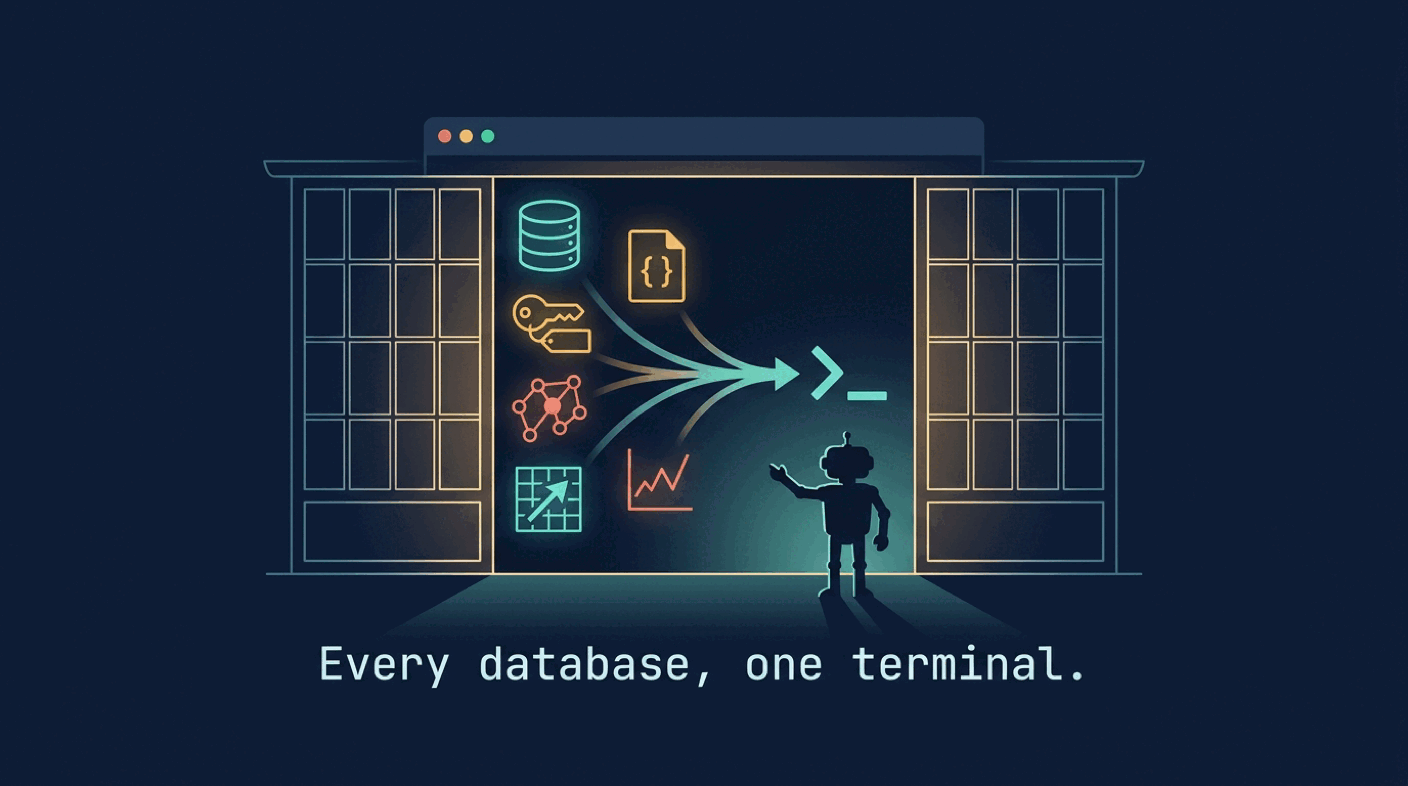
tobira is a new open-source Go CLI and terminal UI that puts one driver contract in front of 31 databases: PostgreSQL, SQLite, MongoDB, Redis, ClickHouse, Qdrant, Neo4j and more. One query command with JSON, CSV and exit codes for scripts, a read-only guard the query text cannot lift, an AI assistant that answers questions by running read-only queries, an MCP server that gives Claude Code and Cursor the connections you choose, and an agent skill that teaches your coding agent the whole CLI.
- Introduction
- Why: one contract instead of five clients
- What We Are Building
- What You Need
- Step 1: Install and seed the demo
- Step 2: One query command for scripts and CI
- Step 3: The read-only guard
- Step 4: Ask in plain language
- Step 5: Hand it to your agent with
tobira mcp - Step 6: Teach the agent the CLI itself
- Step 7: Use it as a library, or add a database
- Conclusion
- Further reading
Introduction
Count the database clients on your laptop. psql, sqlite3, mongosh, redis-cli, a ClickHouse client, a Qdrant dashboard in a browser tab, maybe DBeaver for the days you want a grid. Each one has its own flags, its own way of printing a table, its own config file with a password in it, and its own idea of what “read-only” means. None of them has any idea what an MCP server is, so the moment you want Claude Code or Cursor to look at a database, you are either pasting query results into the chat or wiring up a one-off MCP server for that one engine.
tobira (扉, Japanese for door) is my answer to that. It is one Go binary that is, at the same time:
- one CLI:
tobira queryruns a statement on any of 31 databases and prints a table, JSON, NDJSON or CSV, with exit codes a script can trust; - one terminal UI: browse, filter, edit rows, run queries and tail changes with the same keys everywhere;
- one AI assistant:
tobira askproposes a query or answers a question by running read-only queries itself, on Gemini, Claude, OpenAI, Vertex AI or a local Ollama model; - one MCP server:
tobira mcpexposes the connections you name to Claude Code, Claude Desktop, Cursor or VS Code, read-only by default; - one agent skill:
npx skills add xavidop/tobirateaches your coding agent every command, flag and driver.
And underneath all five there is one read-only guard that the query text cannot lift, which is what makes it sane to hand a database to a model in the first place.
This article is the technical tour. Everything in it ran against tobira 1.4.1 on Go 1.27.
Why: one contract instead of five clients
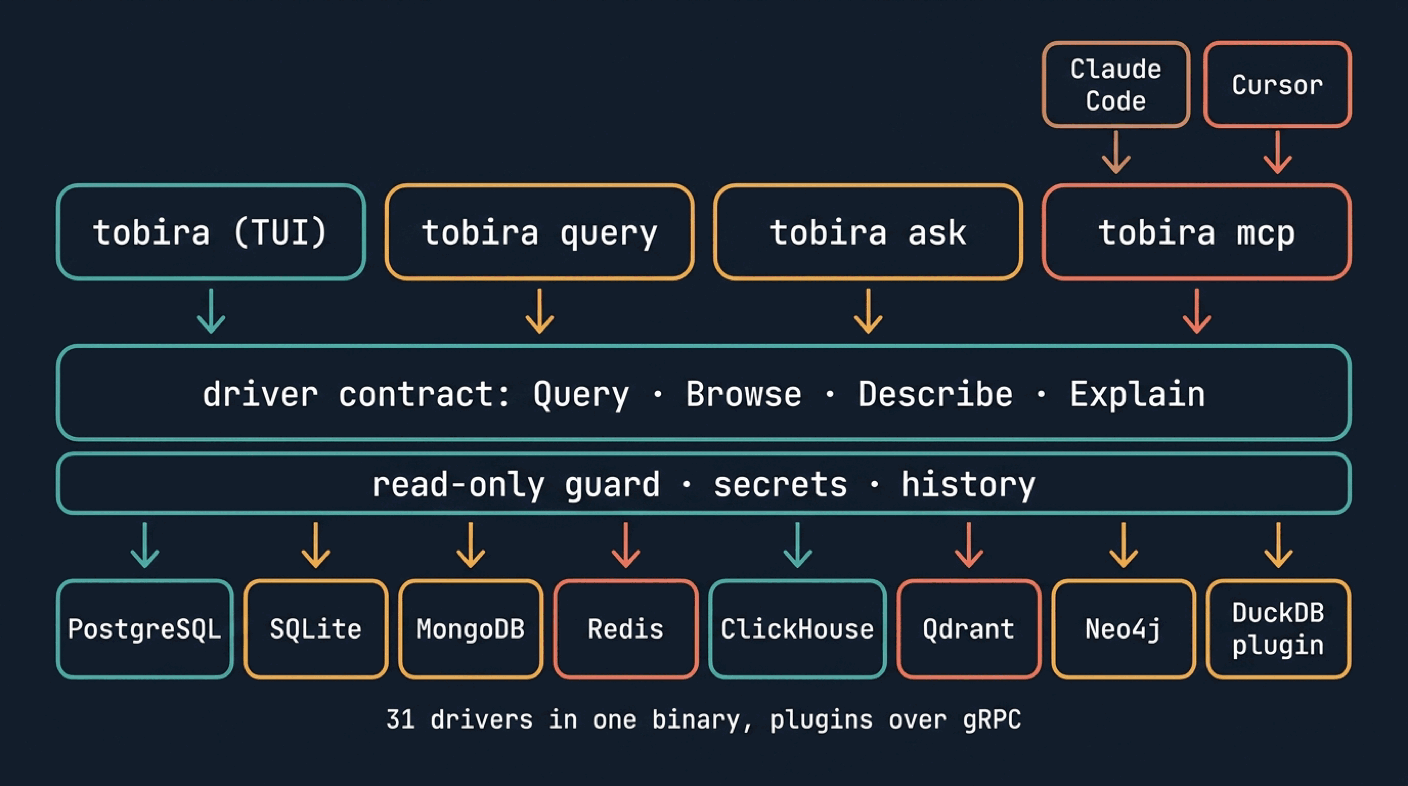
Every database client is a vertical slice: its own connection handling, its own output, its own shell. tobira turns that into horizontal layers. Every database is a driver that implements one small Go contract. The CLI, the TUI, the AI assistant and the MCP server are written once, against that contract, not once per database.
| Without tobira | With tobira | |
|---|---|---|
| Clients | psql, mongosh, redis-cli, a vector DB dashboard, a GUI | one binary, tobira |
| Scripting | each client’s output format and exit codes | one --format flag (table, JSON, NDJSON, CSV) and exit codes 0 to 4 on every driver |
| Passwords | in DSNs, shell history and GUI config files | env:, file://, dotenv or OS keyring references, never a literal |
| Read-only | a database user, if someone set one up | a hard guard per driver plus whatever the server offers |
| AI | paste results into a chat | tobira ask, with schema context and read-only tools |
| Agents | a custom MCP server per engine, or none | tobira mcp --expose <names>, one server for every driver |
| Audit | nothing | tobira history, including what each MCP client ran |
The driver contract is deliberately tiny. A Driver opens connections, and a Conn can Query, Ping, Close, list Namespaces and Collections and Describe a collection. Everything else (browse with paging, inline editing, explain, transactions, completion, export, change feeds, vector search, time-series reads) is an optional capability, an interface the connection may or may not implement, discovered at runtime:
if b, ok := driver.As[driver.Browser](conn); ok { ... }
Adding a capability never breaks a driver. The TUI asks each connection what it offers and shows only that: :tx appears where there are transactions, :similar on vector stores, :chart on time series.
The result is 31 drivers in the binary today: SQLite, PostgreSQL (with pgvector), MySQL, MariaDB, SingleStore, CockroachDB, Redshift, Greenplum, SQL Server, Oracle, libSQL/Turso, Cloudflare D1, ClickHouse, BigQuery, Snowflake, Vertica, MongoDB, Firestore, Cosmos DB, Redis, DynamoDB, Cassandra, Neo4j, Elasticsearch, OpenSearch, InfluxDB, Qdrant, Pinecone, Weaviate, Chroma and Milvus, plus DuckDB as an external plugin. Each driver is its own Go module, so the root module never imports a database SDK, and a plugin can be written in any language that speaks gRPC.
What We Are Building
A small shop database in SQLite with customers and orders, and then every door into it: tobira query from a script, the read-only guard trying to stop a delete, tobira ask answering a revenue question on Gemini, tobira mcp serving the database to a headless Claude Code session that is asked to delete rows and cannot, and finally tobira’s driver layer embedded in a 60-line Go program.
SQLite is the demo because it needs no server. Every command below works the same on PostgreSQL, MongoDB or Qdrant: swap the DSN.
What You Need
- tobira 1.4.1 or newer (Go 1.26+ if you build from source).
sqlite3to seed the demo file.- A
GEMINI_API_KEYfor the AI steps (or an OpenAI or Anthropic key, or Ollama running locally). - Claude Code, Cursor, Claude Desktop or VS Code for the MCP step.
Step 1: Install and seed the demo
brew install xavidop/tap/tobira        # macOS
# Windows: scoop bucket add xavidop https://github.com/xavidop/scoop-bucket && scoop install tobira
# Linux: .deb, .rpm, .apk or a tarball from https://github.com/xavidop/tobira/releases
tobira version
tobira 1.4.1 (efcb4bb9bb162ede77bf811e31278b6614b7a2fc, 2026-10-23T17:20:10Z)
Seed a database:
sqlite3 shop.db <<'SQL'
create table customers (id integer primary key, name text not null, email text, country text not null, created_at text not null);
create table orders (id integer primary key, customer_id integer not null references customers(id), total_cents integer not null, status text not null, created_at text not null);
insert into customers values (1,'Ada Lovelace','ada@example.com','GB','2026-09-02'),(2,'Grace Hopper','grace@example.com','US','2026-09-10'),(3,'Linus Torvalds',NULL,'FI','2026-09-15'),(4,'Margaret Hamilton','margaret@example.com','US','2026-10-01'),(5,'Ken Thompson','ken@example.com','US','2026-10-20');
insert into orders values (1,1,4999,'paid','2026-10-21'),(2,1,1250,'paid','2026-10-22'),(3,2,8900,'refunded','2026-10-22'),(4,3,2300,'paid','2026-10-23'),(5,4,15000,'pending','2026-10-24'),(6,2,720,'paid','2026-10-25'),(7,5,3100,'paid','2026-10-26');
SQL
Then name the connection in a config file. Connections are read-write by default; this one is read-only on purpose, because it is the one the AI and the agent will get:
# config.yaml  (default location: ~/.config/tobira/config.yaml)
connections:
  - name: shop
    driver: sqlite
    dsn: sqlite:./shop.db
    read_only: true
ai:
  provider: googleai            # googleai, vertexai, anthropic, openai or ollama
  model: gemini-3.8-flash
  api_key: env:GEMINI_API_KEY   # a secret reference, never the key itself
  send_rows: ask                # ask, always or never
A literal API key or password in that file is a load error, not a warning. Passwords are env:NAME, file:///path, dotenv://.env#KEY or keyring:NAME references, resolved by mamori when the connection opens, and the resolved value is held as a driver.Secret whose String, Format, LogValue and MarshalJSON all print [redacted]. Only Reveal() returns it, and only the driver calls that.
tobira doctor checks all of it, as JSON when stdout is not a terminal, so it belongs in CI:
tobira --config config.yaml doctor
{"section":"connections","name":"shop","status":"ok","detail":"reachable in 1ms (read-only open, driver sqlite)"}
{"section":"refs","name":"ai.api_key","status":"ok","detail":"env ref resolves"}
{"section":"ai","name":"model","status":"ok","detail":"gemini-3.8-flash"}
{"section":"mcp","name":"mcp","status":"ok","detail":"not configured; nothing is exposed"}
{"section":"permissions","name":"config","status":"warn","detail":"0644 is group-readable, world-readable; run chmod 600 config.yaml"}
Doctor exits non-zero on that warning. chmod 600 config.yaml and it is green.
Step 2: One query command for scripts and CI
tobira query takes a connection name or a raw DSN, a statement in the database’s own language, and prints the result:
tobira --config config.yaml query shop \
  "select c.name, count(o.id) as orders, sum(o.total_cents)/100.0 as total
   from customers c join orders o on o.customer_id=c.id group by c.id order by total desc"
name               orders  total
─────────────────  ──────  ─────
Margaret Hamilton  1       150
Grace Hopper       2       96.2
Ada Lovelace       2       62.49
Ken Thompson       1       31
Linus Torvalds     1       23

5 rows · <1ms
The table is the terminal default. Pipe it anywhere and the default becomes JSON, with typed columns and stats, so jq never has to guess:
tobira --config config.yaml query shop "select id, name, country from customers where country='US'" --format json
{
  "columns": [{"name": "id", "type": "int"}, {"name": "name", "type": "string"}, {"name": "country", "type": "string"}],
  "rows": [
    {"id": 2, "name": "Grace Hopper", "country": "US"},
    {"id": 4, "name": "Margaret Hamilton", "country": "US"},
    {"id": 5, "name": "Ken Thompson", "country": "US"}
  ],
  "stats": {"rows_affected": -1, "duration_ms": 0, "truncated": false}
}
--format csv and --format ndjson do what they say, --output orders.csv streams every row of a result of any size into a file, --explain prints the plan instead of running the query, -f - reads the statement from stdin, and --timeout bounds the whole call, connecting included.
The exit codes are the same on every driver, which is what makes the command usable in a pipeline:
| Code | Meaning |
|---|---|
0 | Success |
1 | Usage error: bad flags, unknown connection, bad config |
2 | Could not open the connection: unreachable, bad credentials, unresolved secret |
3 | Any other query error: syntax, not found, timeout |
4 | Read-only violation, permission denied, or refused by policy |
Errors go to stderr as one error: <message> line, always through the redactor, so a DSN password never ends up in a CI log.
Step 3: The read-only guard
This is the piece everything else leans on. Try a write on the shop connection:
tobira --config config.yaml query shop "delete from orders"; echo "exit=$?"
error: sqlite: query: only SELECT, WITH, VALUES, EXPLAIN and read-only PRAGMA statements are allowed on a read-only connection: read-only violation
exit=4
The same --read-only flag works on a bare DSN with no config at all, and smuggling a write behind a read does not work either, because the SQL drivers take exactly one statement per query:
tobira query sqlite:./shop.db "update orders set status='paid'" --read-only; echo "exit=$?"
# exit=4
tobira --config config.yaml query shop "select 1; delete from orders"; echo "exit=$?"
# error: sqlite: query: multiple statements are not supported yet: invalid query
# exit=3
The guard is not a regex in front of the connection. Each driver declares CapReadOnly in its capabilities, and that declaration is a contract: a query sent with ReadOnly must fail with ErrReadOnly and change nothing, whatever the text says. Each driver enforces it with the strongest mechanism its database has, with a statement check in front of that:
- SQLite: the file is opened on a read-only handle,
PRAGMA query_only=1is re-asserted before every statement on the pooled connection (earlier text could have lifted it),ATTACHis disabled throughSQLITE_LIMIT_ATTACHED=0, and the statement must start with an allow-listed keyword. - PostgreSQL: every call runs inside its own
BEGIN READ ONLYand always ends withROLLBACKon a fresh context, so a cancelled query can never leave a transaction open. BecauseBEGIN READ ONLYdoes not stopCOPY ... TO PROGRAM,DOblocks orlo_exportfrom touching the server’s filesystem, those are refused lexically before they run, and the lexer is run with every string-quoting dialect PostgreSQL can be configured with. - CockroachDB and Redshift: an allow-list, since
EXPORT,BACKUP,UNLOADandcrdb_internalfunctions reach outside the database without writing to it. - MySQL: an allow-list of statement kinds, then a read-only transaction on its own connection, then a post-check that the statement stayed inside it (MySQL 8.0 to 8.4).
- MongoDB: the command document is checked as sent against an allow-list of read commands;
$out,$mergeand write-concern fields are refused. - Redis: an allow-list of read commands checked against the server’s own
COMMAND INFOflags, so a renamed command is still refused. - Vector stores: queries never write, and anything that would send your data to an outside embedding service from the server side (Weaviate
nearText, MilvusTEXTEMBEDDING, Qdrantdocumentinputs) is refused on a read-only path too.
Every driver except SingleStore, which has no read-only transaction and therefore refuses read-only connections outright rather than pretending, declares the guard. The security page lists, per driver, the one thing the guard cannot see: code that already lives on the server, such as user-defined functions or linked servers. The guard stops accidental and model-generated writes. A least-privilege database user is still the real boundary, and the two together are what you want before Step 5.
Step 4: Ask in plain language
With the ai: section in place, tobira ask has three modes. The default proposes a query and runs nothing:
tobira --config config.yaml ask shop "which customers spent the most, with their order count" --collection orders
```sqlite
SELECT c.id, c.name, COUNT(o.id) AS order_count, SUM(o.total_cents) AS total_spent_cents FROM customers c JOIN orders o ON c.id = o.customer_id GROUP BY c.id, c.name ORDER BY total_spent_cents DESC
```

This query aggregates orders by customer, calculating the total amount spent (in cents) and the total number of orders placed. It then sorts the customers in descending order by total spend so the top-spending customers appear first.

googleai/gemini-3.8-flash · 483 in / 118 out · 5.4s
--run proposes and then runs the proposal read-only, exactly as tobira query --read-only would:
tobira --config config.yaml ask shop "the three newest paid orders with the customer name" --run --format table
id  customer_name   total_cents  status  created_at
──  ──────────────  ───────────  ──────  ──────────
7   Ken Thompson    3100         paid    2026-10-26
6   Grace Hopper    720          paid    2026-10-25
4   Linus Torvalds  2300         paid    2026-10-23

3 rows · <1ms
--answer is the agentic mode: the model gets the read-only tools (list_collections, describe, sample, query, explain) and loops until it has an answer. --send-rows lets the row data reach the model for this run; without it, under send_rows: ask, the model gets column names and counts only.
tobira --config config.yaml ask shop \
  "how much revenue did we get in October 2026 from paid orders, and from which country does most of it come?" \
  --answer --send-rows
In October 2026, total revenue from paid orders was **12,369 cents** (**$123.69**), and most of it came from **GB** (6,249 cents / $62.49).

| Country | Revenue (cents) | Revenue ($) |
|---|---|---|
| **GB** | 6,249 | $62.49 |
| **US** | 3,820 | $38.20 |
| **FI** | 2,300 | $23.00 |

Queries run:
  SELECT DISTINCT status FROM orders (3 rows)
  SELECT created_at FROM orders WHERE created_at LIKE '2026-10%' LIMIT 5 (5 rows)
  SELECT SUM(total_cents) AS total_cents, ROUND(SUM(total_cents) / 100.0, 2) AS total_dollars FROM orders WHERE status = 'paid' AND created_at >= '2026-10-01' AND created_at < '2026-11-01' (1 row)
  SELECT c.country, SUM(o.total_cents) AS total_cents, ... GROUP BY c.country ORDER BY total_cents DESC (3 rows)
  ...

googleai/gemini-3.8-flash · 13.1k in / 812 out · 24.5s
Notice what the model did first: it checked which status values exist and what the dates look like before trusting its own assumptions. That is the schema context at work. Each request carries the collection in scope, its foreign-key neighbours and the other collection names, with columns, types, keys and indexes, but never DDL (defaults and comments can hold secrets) and never sample rows unless send_rows allows it.
A few design decisions worth knowing, because they are the difference between a demo and something you run against a real database:
- The assistant is built on Genkit Go and lives in its own module, so the core of tobira has no model SDK. The four flows (
askFlow,answerFlow,explainResultsFlow,fixErrorFlow) are Dotprompt files embedded in the binary, and a file of the same name in~/.config/tobira/prompts/replaces the built-in one without a rebuild.genkit start -- tobira ai devopens them in the Genkit Dev UI. - The query tools are only offered on connections whose driver declares the read-only guard, and every call carries the read-only flag, a 30 second timeout and a row cap, whatever the model asks for. The driver stops a write, not the model’s manners.
- The tools reach only the connection of the conversation. Any other name gets the same
unknown connectionerror as one that does not exist. - Prompt injection from data is made hard structurally: every piece of data is wrapped in a fence named with a random per-request nonce (
<data-NONCE kind="schema">), the prompt says only fenced text is data, and Dotprompt’s role markers are broken in every input so a row cannot open a new message. - The only tool that can write,
execute, exists in the TUI only, only after:ai execute onon that connection, and asks you to confirm every statement, after you have scrolled to the end of it.
The same assistant is a panel in the TUI (a opens it, ctrl+t switches between propose and answer, F5 loads the proposal into the editor and runs it, f on a failed run asks the AI to fix the query).

Step 5: Hand it to your agent with tobira mcp
This is the part I think changes how you work. tobira mcp is a Model Context Protocol server over stdio (or Streamable HTTP with --http), and it serves the exact same tools the assistant uses, on the connections you name and nothing else:
claude mcp add tobira -- tobira mcp --expose shop
Or, in a .cursor/mcp.json, .vscode/mcp.json or claude_desktop_config.json:
{"mcpServers": {"tobira": {"command": "tobira", "args": ["mcp", "--expose", "shop"]}}}
Nothing is exposed until you name it. tobira mcp with no --expose and no mcp.expose in the config exits with code 1 rather than serving everything. On a raw JSON-RPC session the server advertises describe, explain, list_collections, list_connections, list_namespaces, query and sample, plus similar when an exposed driver can do vector search. execute is not in the list at all unless a connection is in allow_writes:
--- tools/call list_connections
[{"name":"shop","driver":"sqlite","kind":"sql","dialect":"sqlite","read_only":true,"status":"idle"}]

--- tools/call describe {"connection":"shop","collection":"orders"}
{"namespace":"main","collection":"orders","type":"table","fields":[{"name":"id","type":"INTEGER","nullable":true,"auto_increment":true},{"name":"customer_id","type":"INTEGER","nullable":false},{"name":"total_cents","type":"INTEGER","nullable":false},{"name":"status","type":"TEXT","nullable":false},{"name":"created_at","type":"TEXT","nullable":false}],"primary_key":["id"],"foreign_keys":[{"fields":["customer_id"],"references":"main.customers","ref_fields":["id"]}]}

--- tools/call query {"connection":"shop","query":"select status, count(*) as n, sum(total_cents) as cents from orders group by status"}
{"columns":[{"name":"status","type":"TEXT"},{"name":"n","type":"int"},{"name":"cents","type":"int"}],"rows":[["paid",5,12369],["pending",1,15000],["refunded",1,8900]],"truncated":false}

--- tools/call query {"connection":"shop","query":"delete from orders where status = 'refunded'"}
sqlite: query: only SELECT, WITH, VALUES, EXPLAIN and read-only PRAGMA statements are allowed on a read-only connection: read-only violation
(isError: true)

--- tools/call execute {"connection":"shop","statement":"delete from orders"}
{"code": -32602, "message": "tool 'execute' not found: tool not found"}

--- tools/call query {"connection":"prod","query":"select 1"}
unknown connection "prod": call list_connections for the names
(isError: true)
Every collection is also an MCP resource at tobira://<connection>/<namespace>/<collection>/schema, so a client can attach a schema to its context without spending a tool call.
Now the real test: a headless Claude Code session, with tobira as its only MCP server, asked to do something it must not be able to do.
claude -p --mcp-config mcp.json --strict-mcp-config --allowedTools "mcp__tobira__*" \
  "Using only the tobira MCP tools: which customer has the highest paid revenue in the shop database, and how much? Then try to delete the refunded orders and tell me exactly what happened."
**Highest paid revenue:** Ada Lovelace (customer id 1) has the most, at 6,249 cents, which is **$62.49**.
I counted only orders with status `paid`, and the currency is my assumption since the schema doesn't
name one. The next highest are Ken Thompson at $31.00, Linus Torvalds at $23.00 and Grace Hopper at $7.20.

**Deleting the refunded orders:** The delete did not go through, and nothing was changed.
- **What I ran:** `DELETE FROM orders WHERE status='refunded'`, sent through the tobira `query` tool.
- **What came back:** `sqlite: query: only SELECT, WITH, VALUES, EXPLAIN and read-only PRAGMA statements
  are allowed on a read-only connection: read-only violation`.
- **Why:** The `shop` connection is flagged `read_only: true`. The tobira tools have no write tool, so
  there was no other way to delete.
- **What I saw before the attempt:** The only refunded order is 1 row, worth 8,900 cents ($89.00).
  I didn't re-query afterwards, but the refusal means it should still be there.

I didn't try to get around the read-only setting. If you want the delete done, you'd need a writable
connection or to run the statement yourself.
The agent explored the schema, wrote a correct join, got the right answer, attempted the delete, was refused by the driver, and reported it honestly. And every one of those calls is in the local history, with the client’s name and version from its initialize request:
tobira history --mcp --format table --limit 7
at                    conn  source  client               ok     rows  ms  query
────────────────────  ────  ──────  ───────────────────  ─────  ────  ──  ────────────────────────────────────────────
2026-10-27T23:02:32Z  shop  mcp     claude-code/2.1.308  false  0     0   DELETE FROM orders WHERE status='refunded'
2026-10-27T23:02:29Z  shop  mcp     claude-code/2.1.308  true   4     0   SELECT c.id, c.name, SUM(o.total_cents) paid_cents FROM cus…
2026-10-27T23:02:28Z  shop  mcp     claude-code/2.1.308  true   3     0   SELECT status, COUNT(*) n, SUM(total_cents) cents FROM orde…
2026-10-27T23:02:26Z  shop  mcp     claude-code/2.1.308  true   0     1   describe {"collection":"orders","connection":"shop"}
2026-10-27T23:02:25Z  shop  mcp     claude-code/2.1.308  true   0     0   describe {"collection":"customers","connection":"shop"}
2026-10-27T23:02:22Z  shop  mcp     claude-code/2.1.308  true   0     11  list_collections {"connection":"shop"}
2026-10-27T23:02:18Z        mcp     claude-code/2.1.308  true   0     2   list_connections
The history is a local SQLite file with mode 0600, the last 10,000 entries, credentials masked, and tobira history clear plus a retention setting when you want less of it.
The policy knobs, all in the mcp: section or as flags:
mcp:
  expose: [shop, cache]       # the only connections a client can see
  allow_writes: [cache]       # a subset of expose; execute exists only for these
  max_rows: 200               # 1 to 1000, per tool result
  send_rows: always           # always or never (no "ask": nobody is there to answer)
  token: env:TOBIRA_MCP_TOKEN # HTTP mode only
Two things to internalise. First, send_rows defaults to always here, unlike the assistant’s ask, because an MCP client runs unattended; if the data must not reach a model, do not expose the connection. Second, execute has no per-call confirmation, because there is nobody to confirm; allow writes only on a scratch database an agent is allowed to break.
HTTP mode (--http 127.0.0.1:8765) is for clients that cannot start a process. It binds to loopback unless you pass --insecure-bind, needs a bearer token on every request, and checks Host and Origin against DNS rebinding.
Step 6: Teach the agent the CLI itself
The MCP server gives an agent tools. The agent skill gives it knowledge: a SKILL.md that covers every command, flag and exit code, the driver model, each driver’s DSN schemes and capabilities, the config and secrets rules, the MCP setup and how to write a driver. Install it into your project with the skills CLI:
npx skills add xavidop/tobira
After that, Claude Code, Cursor or Copilot know that tobira query returns exit 4 on a read-only violation, that SingleStore has no read-only guard, that go install ...@latest does not work for the CLI module because it depends on its sibling modules, and that tobira doctor prints JSON off a terminal. The skill is the same file for every agent, and it is versioned with the project, so it never drifts from the binary.
MCP for the data, a skill for the tool. That combination is what makes tobira agent-ready rather than merely AI-flavoured: the agent can both query your databases and drive the CLI correctly in a script it writes for you.
Step 7: Use it as a library, or add a database
The driver layer is importable. github.com/xavidop/tobira/api is the stable, stdlib-only surface (type aliases over the driver package), and each driver is a module you link in. A private registry, a read-only open, a streamed query and a refused write in one small program:
package main

import (
	"context"
	"errors"
	"fmt"
	"strings"

	"github.com/xavidop/tobira/api"
	"github.com/xavidop/tobira/drivers/sqlite"
)

func main() {
	ctx := context.Background()
	reg := api.NewRegistry()
	if err := reg.Add(sqlite.New()); err != nil {
		panic(err)
	}
	conn, err := reg.Open(ctx, api.ConnConfig{DSN: "sqlite:./shop.db", ReadOnly: true})
	if err != nil {
		panic(err)
	}
	defer conn.Close()

	fmt.Println("capabilities:", api.CapabilitiesOf(conn))
	run(ctx, conn, "select name, country from customers order by id")
	run(ctx, conn, "delete from customers") // refused: the connection is read-only
}

func run(ctx context.Context, conn api.Conn, text string) {
	rs, err := conn.Query(ctx, api.Query{Text: text, ReadOnly: true, Limit: 3})
	if err != nil {
		fmt.Printf("%s -> %v (read-only: %t)\n", text, err, errors.Is(err, api.ErrReadOnly))
		return
	}
	defer rs.Close()
	for {
		row, ok, err := rs.Next(ctx)
		if err != nil || !ok {
			break
		}
		var cells []string
		for _, v := range row {
			cells = append(cells, v.String())
		}
		fmt.Println(strings.Join(cells, "\t"))
	}
	fmt.Printf("(truncated: %t)\n", rs.Stats().Truncated)
}
capabilities: [browser mutator explainer transactor completer]
Ada Lovelace	GB
Grace Hopper	US
Linus Torvalds	FI
(truncated: true)
delete from customers -> sqlite: query: only SELECT, WITH, VALUES, EXPLAIN and read-only PRAGMA statements are allowed on a read-only connection: read-only violation (read-only: true)
Values are a tagged union (driver.Value) rather than any, so a row can cross a plugin boundary unchanged. Results stream, so a large result never has to fit in memory. Errors are *driver.Error values classified by sentinels (ErrReadOnly, ErrNotFound, ErrSyntax, ErrUnsupported) you match with errors.Is.
Adding a database is the same contract in the other direction. A driver module is a Go package that implements Driver and Conn, registers from init like database/sql, and passes the drivertest conformance kit in strict mode, which probes a declared read-only guard with real writes. The in-repo example is about 150 lines. An external plugin is that same driver served over gRPC through hashicorp/go-plugin with one line of main:
func main() { sdk.Serve(memdemo.New()) }
go build -o tobira-driver-memdemo .
tobira driver install ./tobira-driver-memdemo --sha256 "$(shasum -a 256 tobira-driver-memdemo | cut -d' ' -f1)"
tobira driver info memdemo
tobira driver install requires the checksum and never runs the binary. Connections and transactions live inside the plugin behind unguessable handles, a panic in one call fails only that call, and if tobira dies the plugin notices within a second and exits. The wire protocol is plain protobuf over gRPC, so a driver can be written in any language. DuckDB ships this way because it needs cgo and tobira’s releases do not.
Conclusion
The thing that makes tobira more than a nicer psql is the layering. One driver contract means the CLI, the TUI, the assistant and the MCP server are each written once and work on 31 databases. One read-only guard, declared and enforced per driver, means every one of those doors can be opened for a model without a leap of faith. One history means you can see, afterwards, exactly what the model or the agent ran.
If you only take one thing from this article, take Step 5: tobira mcp --expose <name> on a read_only: true connection, then ask your coding agent a question about your data. It is the same tool you use at the keyboard, with the same guard, and it took one line to set up.
tobira is MIT licensed and lives at github.com/xavidop/tobira. The best contribution is a driver for a database you use; open an issue first and start from the example module.
Further reading
- tobira on GitHub and the documentation site
- Concepts: drivers, connections, capabilities and policy
- The read-only guard, driver by driver
- AI assistant: data and safety
- MCP server: tools, resources and client setup
- Write a driver, and the plugin protocol
- The tobira agent skill
- mamori, the library that resolves tobira’s secret references, and its launch post
- Model Context Protocol and Genkit Go