Genkit Middleware v2: Intercept, Extend and Harden your Gen AI Pipelines (English)
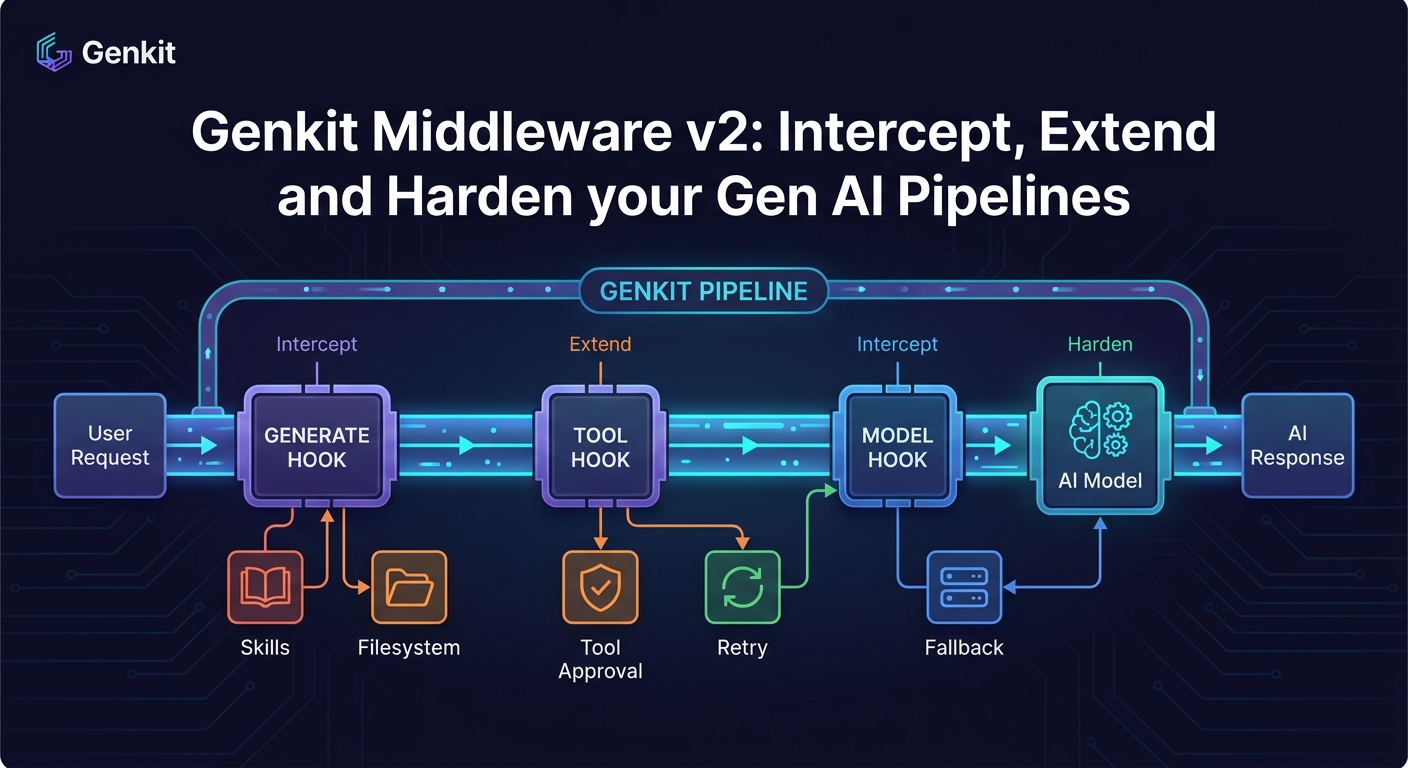
A deep dive into the new Genkit v2 middleware system for JavaScript/TypeScript: built-in middleware (filesystem, skills, toolApproval, retry, fallback), how to build your own with generateMiddleware, and the new model/tool/generate interception hooks.
- Introduction
- What is middleware in Genkit v2
- Installation
- The built-in middleware catalogue
- Building your own middleware with
generateMiddleware - Composition: stacking middlewares
- The importance of middleware V2 for production agents
- Conclusion
Introduction
If you have been building anything non-trivial with Genkit, you have probably bumped into the same set of cross-cutting concerns over and over again: retrying transient model errors, falling back to a cheaper model when quota explodes, gating tool execution behind human approval, injecting filesystem access for coding agents, logging every request and response for observability…
Until now, you ended up either wrapping ai.generate() calls by hand or writing ad-hoc helpers that ended up duplicated across flows. The new Genkit Middleware v2 changes that. It introduces a first-class, composable middleware layer for the generate() pipeline, with hooks for the model, the tool execution and the high-level generation loop, plus a small but very useful set of official middlewares published in the brand new @genkit-ai/middleware package.
This article is a practical tour of what the new middleware system gives you, the built-in middlewares you can drop in today, and how to write your own with generateMiddleware.
The official documentation lives at Genkit Middleware. All examples below assume the JavaScript/TypeScript SDK.
A quick reminder: although this article focuses on the JS/TS middleware API, Genkit is a multi-language framework. The official SDKs cover JavaScript/TypeScript (primary, stable), Go, Python (preview) and Dart/Flutter (preview), and there is a community-maintained Java SDK used in production. The middleware concepts described here are JS/TS-specific today, but the underlying
generate()pipeline exists across all SDKs and the same patterns are landing on the other runtimes.
What is middleware in Genkit v2
Conceptually, Genkit middleware behaves like the middleware you already know from Express or Koa, only applied to the LLM lifecycle instead of HTTP requests:
- A
generate()call is intercepted before it reaches the model. - Each middleware can inspect or modify the request, decide whether to call
next(), and inspect or modify the response on the way back. - Multiple middlewares can be chained. They run in the order they are declared and unwind in reverse order, exactly like an onion.
What makes Genkit’s design interesting is that it does not give you a single chokepoint, it gives you three orthogonal interception phases:
model— wraps the call to the underlying model. Perfect for retries, fallbacks, request/response logging or response transformations.tool— wraps tool execution. Ideal for approvals, sandboxing, audit logs or input/output validation.generate— wraps the whole high-level generation loop (prompting, tool calling, output parsing). Best for things like injecting tools or system instructions before the loop starts.
You opt in per call via a use: array, which keeps things explicit and avoids global side effects:
const response = await ai.generate({
  model: googleAI.model('gemini-flash-latest'),
  prompt: 'Hello',
  use: [retry({ maxRetries: 3 }), loggerMiddleware({ verbose: true })],
});
Installation
The official middlewares ship in their own package, decoupled from the Genkit core:
npm install @genkit-ai/middleware
# or
pnpm add @genkit-ai/middleware
You still need genkit itself and a model provider plugin (for example @genkit-ai/google-genai).
The built-in middleware catalogue
Let’s go through the five middlewares the Genkit team ships out of the box.
filesystem — give the model a sandboxed file system
filesystem injects a standard set of file manipulation tools (list_files, read_file, write_file, search_and_replace) into the generation loop, restricted to a root directory of your choice.
import { genkit } from 'genkit';
import { googleAI } from '@genkit-ai/google-genai';
import { filesystem } from '@genkit-ai/middleware';

const ai = genkit({ plugins: [googleAI()] });

const response = await ai.generate({
  model: googleAI.model('gemini-flash-latest'),
  prompt: 'Create a hello world Node app in the workspace',
  use: [
    filesystem({
      rootDirectory: './workspace',
      allowWriteAccess: true,
    }),
  ],
});
Useful options:
rootDirectory(required) — sandbox root, all paths are confined to it.allowWriteAccess— defaults tofalse. Read-only by default is a sane choice for safety.toolNamePrefix— namespace the injected tools to avoid collisions with your own.
This is essentially the building block for a “coding agent” pattern, without you having to write tool definitions or path validation logic.
skills — auto-load Markdown skills as system context
skills scans a directory for SKILL.md files (plus their YAML frontmatter), injects relevant ones into the system prompt, and exposes a use_skill tool the model can call when it needs more specific guidance.
import { skills } from '@genkit-ai/middleware';

const response = await ai.generate({
  prompt: 'How do I run tests in this repo?',
  use: [skills({ skillPaths: ['./skills'] })],
});
Think of it as a lightweight, file-based knowledge layer: every skill is a self-contained Markdown file with metadata, and the middleware decides when to surface them. It is a really clean alternative to ad-hoc system prompt soup.
toolApproval — human-in-the-loop for tool calls
toolApproval enforces an allowlist of tools the model is allowed to execute autonomously. Anything outside the list raises a ToolInterruptError, so you can pause execution, ask the user, and resume.
import { genkit, restartTool } from 'genkit';
import { toolApproval } from '@genkit-ai/middleware';

const response = await ai.generate({
  prompt: 'write a file',
  tools: [writeFileTool],
  use: [toolApproval({ approved: [] })], // empty list -> always interrupt
});

if (response.finishReason === 'interrupted') {
  const interrupt = response.interrupts[0];

  // ... ask the user, then mark the tool call as approved
  const approvedPart = restartTool(interrupt, { toolApproved: true });

  const resumedResponse = await ai.generate({
    messages: response.messages,
    resume: { restart: [approvedPart] },
    use: [toolApproval({ approved: [] })],
  });
}
This is exactly the pattern you want for any agent that touches the real world (filesystem writes, payments, sending emails). No more home-grown approval flags scattered across the codebase.
retry — exponential backoff with jitter for transient errors
The retry middleware retries failed model calls on transient status codes (UNAVAILABLE, DEADLINE_EXCEEDED, RESOURCE_EXHAUSTED, ABORTED, INTERNAL) using exponential backoff with jitter.
import { retry } from '@genkit-ai/middleware';

const response = await ai.generate({
  model: googleAI.model('gemini-pro-latest'),
  prompt: 'Heavy reasoning task...',
  use: [
    retry({
      maxRetries: 3,
      initialDelayMs: 1000,
      backoffFactor: 2,
    }),
  ],
});
Knobs you actually care about:
maxRetries(default3)statuses— which status codes to retry oninitialDelayMs/maxDelayMs/backoffFactornoJitter— if you really want deterministic delays
This is one of those things every team writes once, badly. Having it in the framework is a very welcome change.
fallback — gracefully degrade to a different model
fallback switches to an alternate model when the primary one fails on configurable status codes. The classic use case is “try Pro first, fall back to Flash when quota is exhausted”:
import { fallback } from '@genkit-ai/middleware';

const response = await ai.generate({
  model: googleAI.model('gemini-pro-latest'),
  prompt: 'Try the pro model first...',
  use: [
    fallback({
      models: [googleAI.model('gemini-flash-latest')],
      statuses: ['RESOURCE_EXHAUSTED'],
    }),
  ],
});
You can chain multiple fallback models, and isolateConfig lets you decide whether the fallback inherits the original request configuration or starts clean (handy when the fallback model does not support the same options as the primary).
Building your own middleware with generateMiddleware
The same primitive that powers all the built-ins is exposed for you. The generateMiddleware helper gives you typed config schemas (via Zod) and access to the ai instance.
Here is the canonical “logger” example, straight from the docs but lightly annotated:
import { generateMiddleware, z } from 'genkit';

export const loggerMiddleware = generateMiddleware(
  {
    name: 'loggerMiddleware',
    description: 'Logs requests and responses',
    configSchema: z.object({
      verbose: z.boolean().optional(),
    }),
  },
  ({ config, ai }) => {
    return {
      // Phase 1: intercept the model call
      model: async (req, ctx, next) => {
        if (config?.verbose) {
          console.log('Request:', JSON.stringify(req));
        }
        const resp = await next(req, ctx);
        if (config?.verbose) {
          console.log('Response:', JSON.stringify(resp));
        }
        return resp;
      },
      // You could also add `tool: ...` and `generate: ...` hooks here.
    };
  }
);
Using it is identical to the official ones:
const response = await ai.generate({
  model: googleAI.model('gemini-flash-latest'),
  prompt: 'Hello',
  use: [loggerMiddleware({ verbose: true })],
});
A few patterns I have found very useful:
- PII redaction — implement a
modelhook that scrubs the request prompt and the response text against a regex/dictionary, returning the cleaned version. - Cost accounting — wrap the
modelhook to readusagetokens from the response, and emit them to your metrics backend tagged by user/feature. - Per-tenant quotas — use the
generatehook to check a counter (Redis, Firestore…) before callingnext(); throw your own custom error if the tenant is over quota. - Caching — keyed on a hash of the model + request, return a cached response if hit, otherwise call
next()and persist the result.
For more inspiration, the source of the official middlewares is open in the Genkit GitHub repository, and reading them is genuinely educational.
Composition: stacking middlewares
Middlewares compose in array order. A reasonable production stack might look like this:
const response = await ai.generate({
  model: googleAI.model('gemini-pro-latest'),
  prompt: userPrompt,
  tools: myTools,
  use: [
    loggerMiddleware({ verbose: false }),       // outermost: see everything
    retry({ maxRetries: 3 }),                   // recover from transient failures
    fallback({                                  // degrade if Pro is overloaded
      models: [googleAI.model('gemini-flash-latest')],
      statuses: ['RESOURCE_EXHAUSTED'],
    }),
    toolApproval({ approved: ['searchDocs'] }), // gate dangerous tools
  ],
});
The order matters: outer middlewares see the result of the inner ones. Put logging on the outside if you want it to record the final state after retries and fallbacks; put it on the inside if you want to see every individual model attempt.
The importance of middleware V2 for production agents
Genkit Middleware v2 is one of those features that does not look flashy in a changelog but quietly fixes a lot of real-world friction. It pushes Genkit closer to a “batteries-included” framework for production agents:
- Cross-cutting concerns are no longer copy-pasted across flows.
- Safety-critical behavior (approvals, sandboxes, fallbacks) is declarative.
- The
model/tool/generatesplit gives you precise control without forcing you to monkey-patch. - The middleware contract is small enough that the community can ship plugins that interoperate.
If you maintain any non-trivial Genkit application, the upgrade is a no-brainer. Drop in retry and fallback first, you will probably see incidents disappear within the week. Then start writing your own middlewares for the things that are unique to your domain.
Conclusion
Middleware v2 turns Genkit’s generate() from “a function you call” into “a pipeline you compose”. The official @genkit-ai/middleware package covers the most common production needs (filesystem access, skills, tool approval, retries, fallbacks), and generateMiddleware makes writing your own a 20-line affair instead of a refactor.
For the next steps, take a look at:
- Genkit Middleware documentation
- Genkit middleware source on GitHub
- Genkit flows — middleware composes especially well with typed flows
- Tool calling and Interrupts — the foundation that
toolApprovalbuilds on
Happy hacking, and may your fallback models always be cheaper than your primary one.