Durable Genkit Flows with Temporal: Introducing the genkitx-temporal Plugin (English)
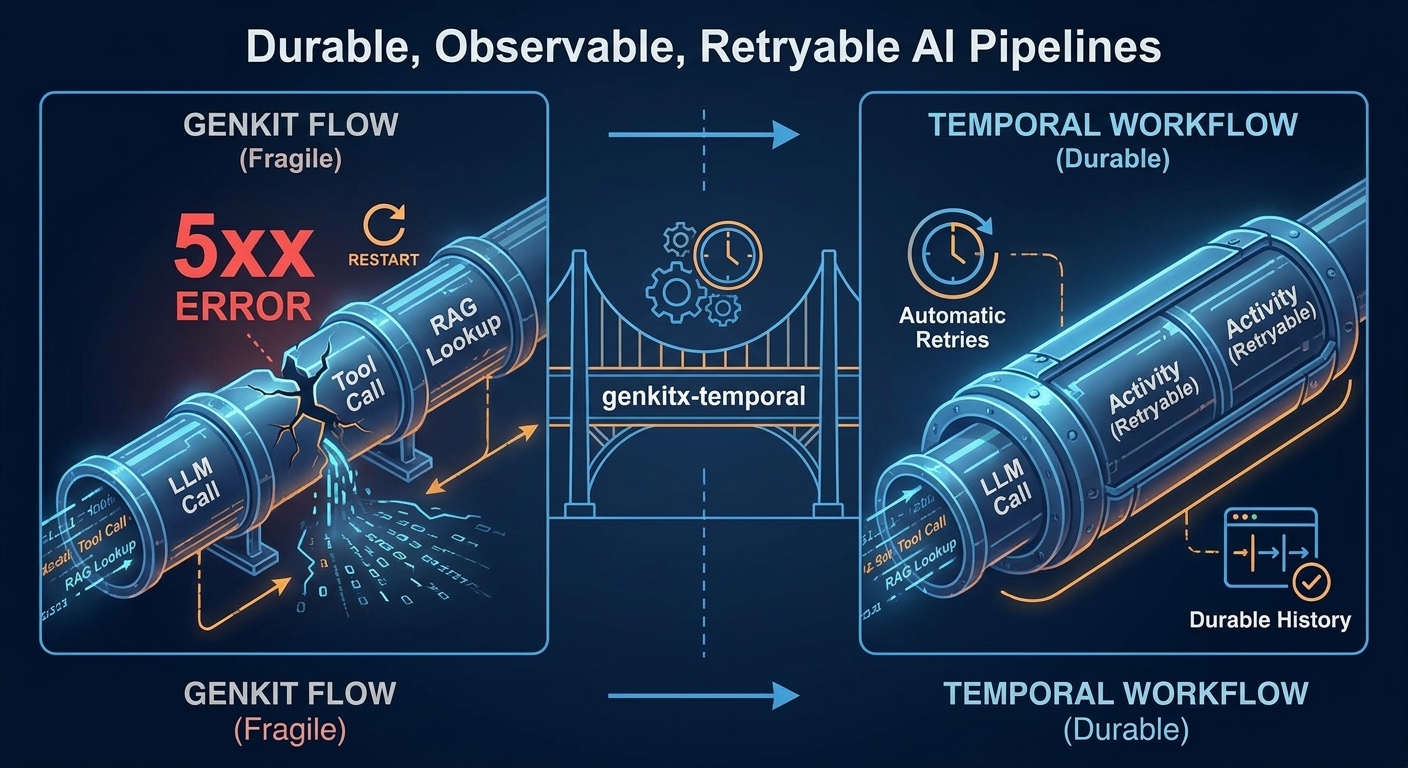
Genkit flows are great at orchestrating LLMs, tools and RAG, but they live and die with the process that runs them. The new genkitx-temporal plugin lets you run any Genkit flow as a Temporal Workflow, giving you retries, durable history, timeouts, cancellation and a UI to inspect every execution.
- Introduction
- What is
genkitx-temporal? - Why Temporal and Genkit are a great match
- Installation
- Usage end to end
- API summary
- When to reach for
genkitx-temporal - How it pairs with the rest of the Genkit ecosystem
- Conclusion
Introduction
Anyone who has shipped a non-trivial Gen AI feature to production has hit the same wall: the happy path is fun to demo, but the unhappy path is brutal. Model providers throw 5xx errors. Rate limits kick in at the worst possible moment. A long-running agent gets halfway through a 12-step plan and the pod is restarted by Kubernetes. A user closes the tab in the middle of a streaming response and you have no idea what state the flow ended up in.
Genkit gives you a clean way to author those LLM-orchestrating pipelines as flows, but a Genkit flow, by itself, is just a function. It lives and dies with the process that invokes it. There is no durable history, no automatic retry policy, no built-in cancellation, no operations UI.
This is exactly the gap that Temporal was designed to close for general-purpose backend code, and it is the gap that the new genkitx-temporal plugin closes for Genkit flows.
In this article we will look at:
- What the plugin actually does.
- Why Temporal and Genkit are a particularly good match.
- How to use it end to end: define, register, run.
- When you should reach for it (and when you probably shouldn’t).
What is genkitx-temporal?
genkitx-temporal is a Genkit plugin that lets you execute any Genkit flow inside a Temporal Workflow, transparently. You keep writing flows the way you always have; the plugin takes care of:
- Registering the flow so a Temporal Worker can pick it up.
- Wrapping each execution in a deterministic Temporal Workflow.
- Running the non-deterministic LLM/tool/RAG work inside a Temporal Activity, so retries and timeouts are safe.
- Giving you helpers to start workflows from any client.
Under the hood, the plugin ships a generic, deterministic workflow called runGenkitFlow that invokes a single Temporal Activity called runGenkitFlowActivity. The activity looks up your Genkit flow by name in an in-process registry and runs it inside a full Node environment, where all the messy, non-deterministic things (network calls, model calls, tool calls, RAG lookups) are perfectly fine.
┌────────────┐  start workflow   ┌──────────────────────┐
│  Client    │ ────────────────▶ │  Temporal Server     │
└────────────┘                   └─────────┬────────────┘
                                           │ task
                                           ▼
                                ┌──────────────────────┐
                                │  Worker process      │
                                │  ┌────────────────┐  │
                                │  │ runGenkitFlow  │  │  (workflow, sandboxed)
                                │  │       │        │  │
                                │  │       ▼        │  │
                                │  │ runGenkit-     │  │  (activity, full Node)
                                │  │ FlowActivity   │  │
                                │  │       │        │  │
                                │  │       ▼        │  │
                                │  │  your Genkit   │  │
                                │  │  flow (LLM…)   │  │
                                │  └────────────────┘  │
                                └──────────────────────┘
This split is the whole trick. Temporal Workflows are required to be deterministic so that they can be replayed from event history after a crash, deploy or scale event. LLM calls obviously are not deterministic. Putting the LLM work inside an Activity is the canonical Temporal pattern, and the plugin does it for you so you don’t have to think about it.
Why Temporal and Genkit are a great match
It is easy to underestimate how much engineering is hiding behind “just call the model again if it fails”. Once you start building real agents, the list of things you want from your runtime grows quickly. Genkit gives you the authoring primitives, and Temporal gives you the runtime guarantees. Together:
- Automatic retries for transient errors. LLM providers regularly return 429s and 5xx. Tool calls hit the network. Vector stores time out. Temporal lets you express retry policies (exponential backoff, max attempts, non-retryable error types) declaratively, applied to every flow execution.
- Durable history. Every event in your flow’s execution is persisted by the Temporal Server. If your Worker pod is killed mid-flow, another Worker picks up the workflow exactly where it left off, with all prior activity results intact. No partial state, no double-charging the user, no orphan jobs.
- Timeouts, heartbeats and cancellation. Long-running agents that browse, plan and call tools for minutes are a nightmare to control with plain HTTP. Temporal models start-to-close, schedule-to-close and heartbeat timeouts as first-class concepts, plus explicit cancellation semantics you can wire to a user closing a tab.
- Operational visibility out of the box. The Temporal UI gives you a per-execution timeline of every workflow and activity. You can see inputs, outputs, retries, failures and stack traces, search by workflow id, terminate or signal running workflows. This complements the Genkit Developer UI nicely: Genkit’s UI is your local debugging tool during development; Temporal’s UI is your operational dashboard in staging and production.
- Horizontal scalability for free. Need more throughput? Run more Worker processes pointing at the same task queue. The Temporal Server load-balances workflows and activities across them. Your flows did not need to change.
- Long-running, human-in-the-loop friendly. Temporal workflows can sleep for days, wait for signals from external systems, and resume cleanly. Perfect for agents that need approval before executing a sensitive tool, or RAG pipelines that wait for a document indexing job to finish.
In other words, genkitx-temporal turns your Genkit flows from “smart functions inside a Node process” into first-class durable workloads without changing the way you write them.
Installation
npm install genkitx-temporal genkit
The Temporal SDK packages are peer-installed automatically as dependencies of the plugin.
You also need a running Temporal Server. For local development, the easiest path is:
brew install temporal
temporal server start-dev
This starts a Temporal Server on localhost:7233 and the UI on http://localhost:8233.
Usage end to end
The plugin exposes a small, focused API. Three things are enough to ship a durable Genkit flow: define it with the Temporal-aware helper, start a Worker, and execute it from a client.
1. Define a flow with defineTemporalFlow
defineTemporalFlow is a drop-in replacement for ai.defineFlow. The returned object is a normal Genkit flow, so you can still call it directly, expose it via the Developer UI, run it from tests, etc. The only difference is that it is also registered internally so a Temporal Worker can find it by name.
// flows.ts
import { genkit, z } from 'genkit';
import { googleAI } from '@genkit-ai/google-genai';
import { defineTemporalFlow, temporal } from 'genkitx-temporal';

export const ai = genkit({
  plugins: [
    googleAI(),
    temporal({ taskQueue: 'my-queue' }),
  ],
  model: googleAI.model('gemini-flash-latest'),
});

export const jokeFlow = defineTemporalFlow(
  ai,
  {
    name: 'jokeFlow',
    inputSchema: z.string(),
    outputSchema: z.string(),
  },
  async (subject) => {
    const { text } = await ai.generate(`Tell me a joke about ${subject}`);
    return text;
  },
);
A few things to notice:
- You configure the plugin like any other Genkit plugin, passing the Temporal task queue (and optionally
address,namespace, etc.). - The flow body is plain Genkit code. No Temporal-specific imports, no
proxyActivities, no determinism gymnastics. The plugin handles all that for you. - The flow’s
nameis also its Temporal registration key. Keep it unique within your Worker.
2. Start a Worker
Workers are the processes that actually execute your flows. A Worker imports your flows (so the registry is populated) and then calls startTemporalWorker:
// worker.ts
import './flows';   // side-effect import: registers the flows
import { startTemporalWorker } from 'genkitx-temporal';

startTemporalWorker({ taskQueue: 'my-queue' })
  .catch((e) => { console.error(e); process.exit(1); });
node ./dist/worker.js
You can run as many Worker processes as you want against the same task queue. Temporal will distribute work across them automatically. If a Worker dies mid-flow, another one picks up.
3. Execute a flow as a Temporal Workflow
From any client (an HTTP handler, a CLI, a cron job, another workflow), use executeTemporalFlow to start a workflow and await its result:
// client.ts
import { executeTemporalFlow } from 'genkitx-temporal';
import { jokeFlow } from './flows';

const result = await executeTemporalFlow(jokeFlow, 'cats', {
  taskQueue: 'my-queue',
});
console.log(result);
If you don’t want to block on the result, use startTemporalFlow instead. It returns the raw Temporal WorkflowHandle, which lets you query, signal, or cancel the running workflow later. This is the building block for human-in-the-loop scenarios, scheduled flows, fan-out/fan-in patterns, and so on.
Configuration
temporal(options) and every helper accept the same connection options. Anything you don’t pass falls back to environment variables, then to sensible defaults:
| Option | Env var | Default |
|---|---|---|
address | TEMPORAL_ADDRESS | localhost:7233 |
namespace | TEMPORAL_NAMESPACE | default |
taskQueue | TEMPORAL_TASK_QUEUE | genkit |
This makes it straightforward to run the same code locally against a dev server and in production against Temporal Cloud or a self-hosted cluster.
Advanced: combine with your own workflows and activities
The bundled runGenkitFlow workflow is enough for the common case. If you want to mix Genkit flows with your own existing Temporal workflows and activities, the plugin lets you bring your own:
await startTemporalWorker({
  taskQueue: 'my-queue',
  workflowsPath: require.resolve('./my-workflows'),
  activities: { ...require('./my-activities') },
});
// my-activities.ts
export { runGenkitFlowActivity } from 'genkitx-temporal/activities';
export async function myOtherActivity(/* ... */) { /* ... */ }
Re-exporting runGenkitFlowActivity keeps the built-in workflow working, so you can compose Genkit flows alongside hand-written activities for the parts of your system that aren’t AI.
API summary
The full public surface is tiny:
temporal(options?)— the Genkit plugin.defineTemporalFlow(ai, config, fn)— define a flow and register it for Temporal execution.startTemporalWorker(options?)— start a Worker process.executeTemporalFlow(flow, input, options?)— run a flow inside a Workflow and await the result.startTemporalFlow(flow, input, options?)— same, but returns theWorkflowHandlefor fire-and-forget / signalling.runGenkitFlowActivity— the underlying activity, re-exported so you can combine it with your own activities.registerTemporalFlow(name, flow)— manually register a flow that was defined elsewhere (useful when wrapping flows you don’t own).
A small API surface is the point. The plugin is intentionally a thin bridge between two well-designed systems; it does not try to reinvent either of them.
When to reach for genkitx-temporal
Not every flow needs a durable runtime. A streaming chat response that takes 800ms and either succeeds or is retried by the user is fine running on a plain HTTP handler.
You will feel the benefits the moment your flows look like one of these:
- Multi-step agents that orchestrate several model calls and tool invocations, where partial progress is expensive to throw away.
- Long-running pipelines (document ingestion, batch summarization, fine-tuning prep) where individual steps can take minutes and the process must survive deploys.
- Critical business workflows (refunds, account changes, contract generation) where you cannot afford to lose state or accidentally execute a step twice.
- Human-in-the-loop agents that need to pause for approval, an external webhook, or a manual review before proceeding.
- Anything you currently glue together with a job queue, a retry library, and a state machine. Temporal subsumes all three, and
genkitx-temporalplugs Genkit straight into it.
If your team already runs Temporal for non-AI workloads, this plugin is a no-brainer: it lets your Gen AI features inherit all the operational maturity your platform team has already built around it.
How it pairs with the rest of the Genkit ecosystem
The thing I like the most about this plugin is that it composes cleanly with everything else Genkit gives you, not just one or two features:
- Genkit Developer UI. Because
defineTemporalFlowreturns a normal Genkit flow, you can still iterate on it locally with the Genkit Developer UI: fast feedback loop during development, durable execution in production. - Genkit middleware. Middleware (in-call retries, fallbacks, skill injection, tool approval, prompt rewriting, etc.) runs inside the activity. You get two complementary layers of resilience: middleware for fine-grained in-call recovery, Temporal for whole-flow durability and replay.
- Tools and function calling. Tools defined with
ai.defineToolare just normal flow code from Temporal’s perspective. Their calls, retries and outputs appear in both the Genkit trace and the Temporal event history. - RAG primitives. Retrievers, indexers, embedders and rerankers all live inside the activity. That means heavy ingestion jobs (chunking, embedding, upserting into a vector store) inherit Temporal’s retry policies and survive restarts mid-batch.
- Evaluators and datasets. Genkit’s evaluators are flows like any other, so you can run eval jobs as Temporal Workflows, schedule them, fan them out across Workers, and inspect every run in the Temporal UI.
- Prompts and Dotprompt. Versioned
.promptfiles, prompt registries and structured outputs all work unchanged. The flow body is plain Genkit. - Plugins and model providers. Any Genkit plugin (Google AI, Vertex AI, OpenAI, Anthropic, Ollama, local models, vector stores, etc.) plugs in as usual; the Temporal layer doesn’t care which provider is on the other side of the call.
- Telemetry and tracing. Genkit’s OpenTelemetry traces continue to be emitted from inside the activity, so they show up in whatever observability backend you already use, alongside Temporal’s own event history.
- Deployment surfaces. Flows can still be exposed as HTTP endpoints, Cloud Functions, Firebase callable functions or Express handlers;
executeTemporalFlowis just one more entry point, and you can mix and match (e.g. quick chat requests over HTTP, long agent runs through Temporal). - Multi-language story. Genkit is available in JS/TS, Go, Python (preview), Dart/Flutter (preview) and through a community Java SDK. This particular plugin targets JS/TS, but the architectural pattern — define your AI logic in Genkit, run it as a Temporal Workflow — is reusable across runtimes thanks to Temporal’s polyglot SDKs.
Conclusion
Genkit is a great way to author Gen AI logic. Temporal is a great way to run any long-running, failure-prone workload. genkitx-temporal is the missing adapter between the two: a small, focused plugin that turns every Genkit flow into a durable, retryable, observable Temporal Workflow without asking you to rewrite a single line of business logic.
If you are building anything more ambitious than a single-turn chat endpoint, give it a try:
- Source: github.com/xavidop/genkitx-temporal
- Docs: xavidop.github.io/genkitx-temporal
- Runnable example:
examples/test-app
Your future on-call self will thank you the first time a model provider has a bad afternoon and your agents keep humming along regardless.